Platform Features
Every Tool Built Into
Great Circle Pro
One free browser-based tool covering flight planning, range analysis, ETOPS mapping, payload-range charts, and multi-leg chain routing - no login, no software, no waiting.
Primary Tool
Flight Planning
Wind-Corrected Flight Time Calculator
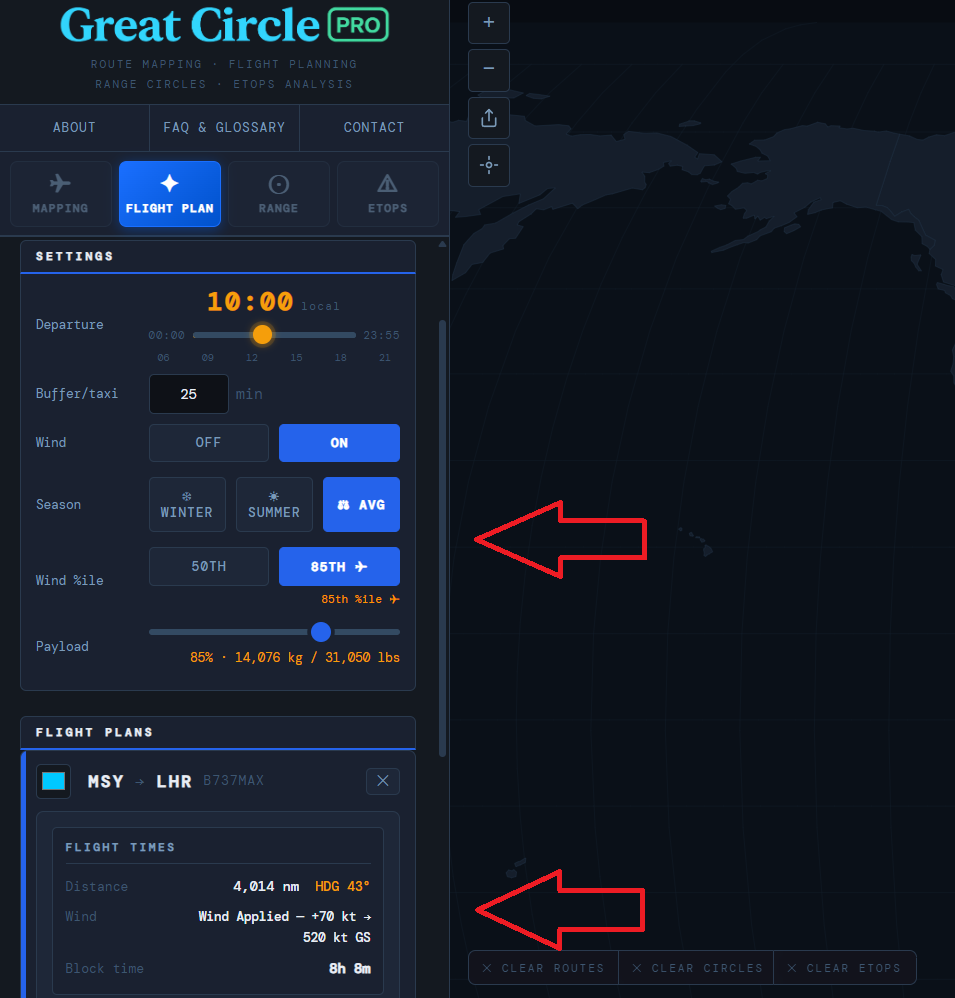
Great Circle Pro's Flight Planning tab gives airline planners, charter operators, and pilots a precise, wind-adjusted flight time calculator built directly into the route map. Unlike basic distance tools, it accounts for real-world upper-level wind patterns across every major corridor, so the block times you see reflect actual operating conditions, not still-air geometry.
The tool uses a global wind model segmented by region and season. Toggle between summer winds, winter winds, and a long-run average to understand how seasonal jet stream shifts affect block time on any routing. Eastbound versus westbound? The calculator handles asymmetric block times correctly, which is critical when scheduling crew duty periods and computing turn times.
The departure time slider sets your block departure in five-minute increments and immediately updates the estimated UTC arrival. All inputs are encoded into the page URL, so sharing a specific scenario is as simple as copying the link. Whether you are validating a published schedule, comparing aircraft types on a common sector, or roughing out a new route, the Flight Planning tab gives you a fast, map-integrated starting point grounded in real wind data.
- Summer, winter, and average seasonal wind profiles per global region
- Departure time slider with five-minute resolution
- Correct eastbound and westbound asymmetric block times
- UTC arrival with full URL state encoding for easy sharing
Plan a route now →
Primary Tool
Range Circles
Great Circle Range Circle Overlay
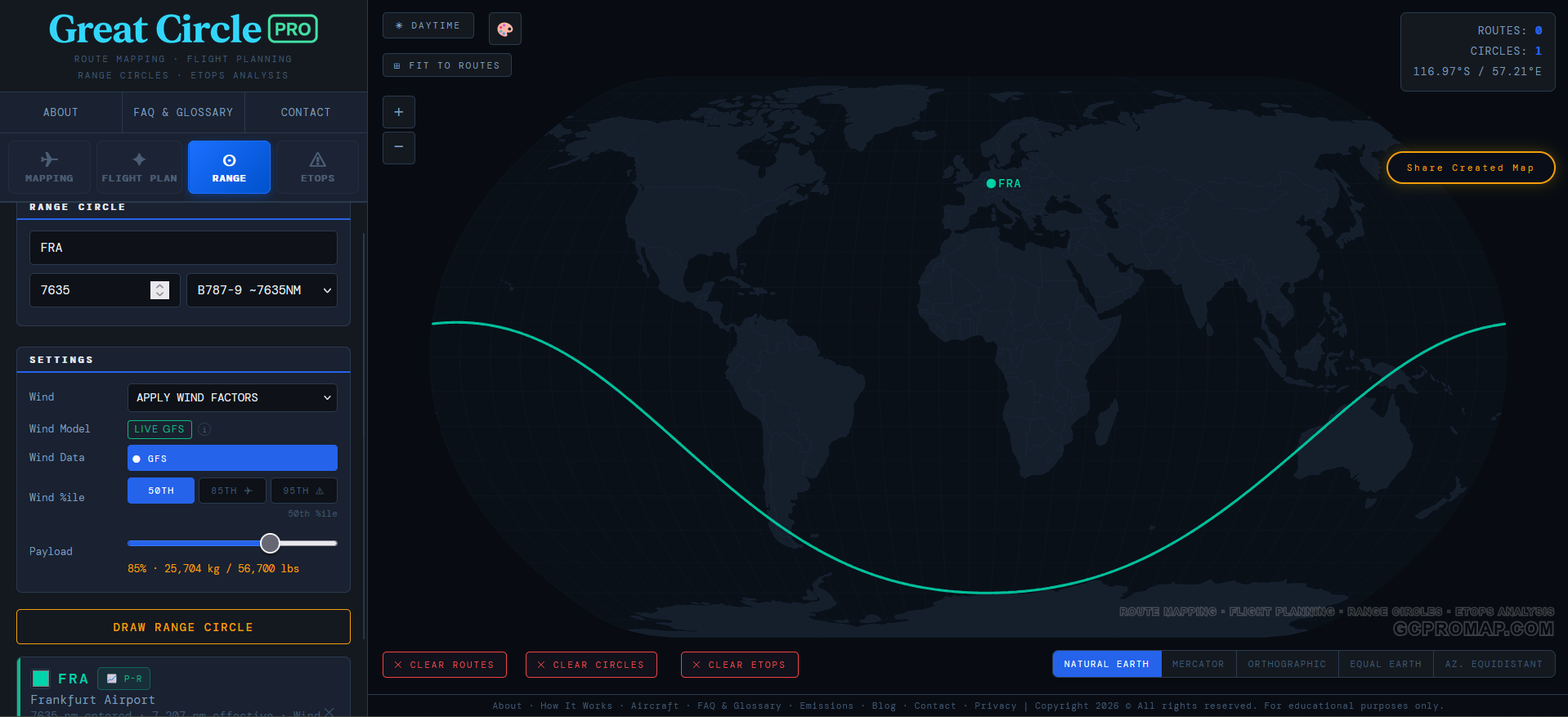
Understanding what is reachable from any airport is one of the most fundamental questions in route planning, fleet deployment, and network strategy. Great Circle Pro's Range Circle tool renders geodetically accurate range rings around any airport in the database, giving you an immediate picture of which destinations fall within a given aircraft's maximum range.
Unlike flat-map range circles that distort severely with latitude, Great Circle Pro draws rings that correctly represent true great circle distance from the center point. This matters most at high-latitude hubs where Mercator distortion would make nearby destinations appear farther and distant polar-track cities appear closer than they are. The rings here reflect actual flight distances, not cartographic illusions.
Set the range in nautical miles or kilometers and place multiple concentric rings simultaneously to compare range variants of the same aircraft family or model different payload scenarios against range limits. Move the center point to any airport in the database and the rings replot instantly. Network planners use this to evaluate hub viability, spot thin markets just within reach, and compare fleet options without leaving the browser.
- Geodetically accurate rings - no Mercator latitude distortion
- Multiple concentric rings for variant and payload comparison
- Input in nautical miles or kilometers
- Instant replot when the center airport changes
Plot your range →
Primary Tool
ETOPS Analysis
ETOPS / EDTO Diversion Coverage Mapping
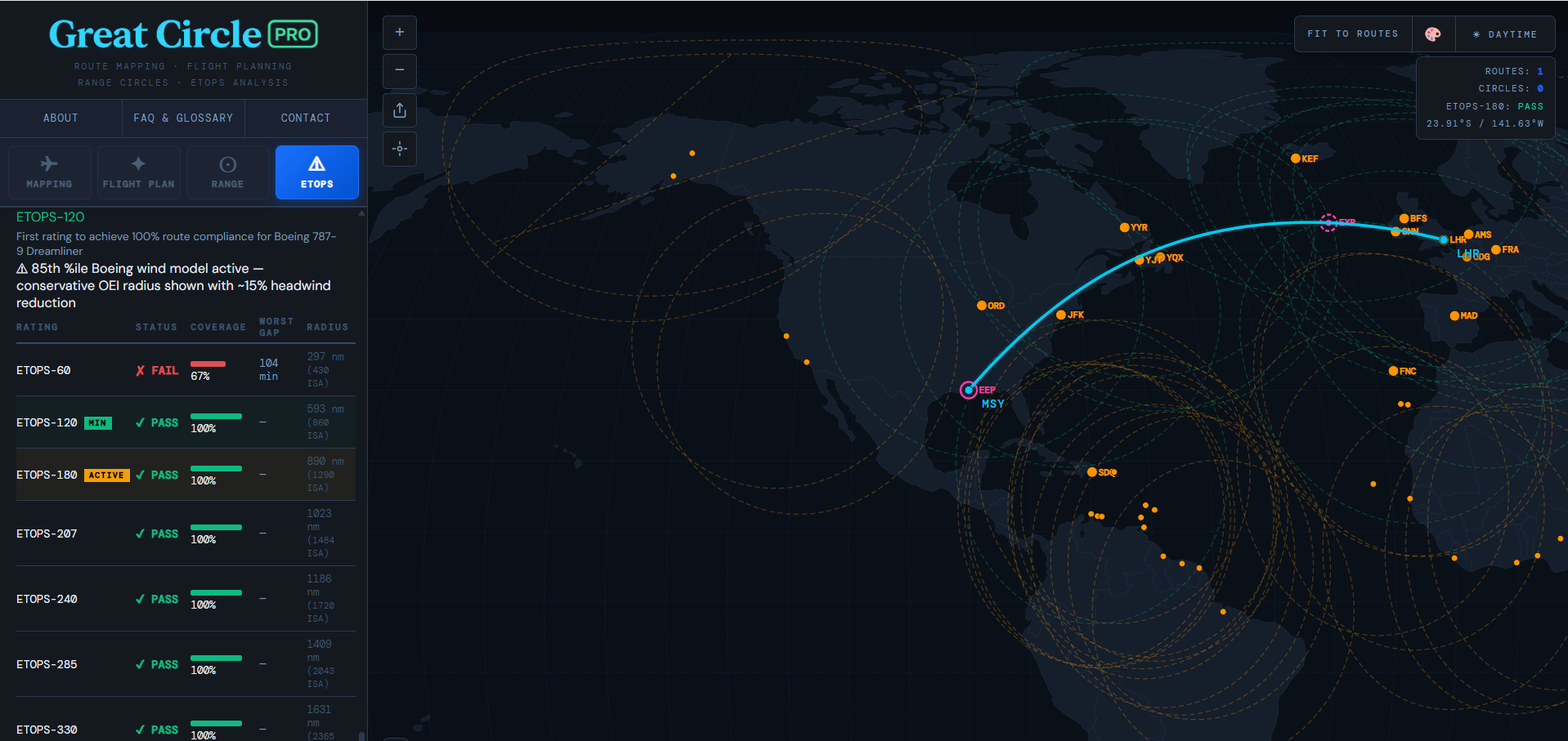
Extended Operations -- ETOPS under FAA rules or the ICAO equivalent EDTO -- require twin-engine aircraft to remain within a defined diversion threshold of an adequate alternate airport for the entire route. Great Circle Pro's ETOPS tab turns this regulatory requirement into a visual, interactive planning tool that shows exactly where a route is exposed and which airports provide coverage along the way.
Enter your aircraft's approved ETOPS threshold -- 60, 120, 138, 180, 207, or 240 minutes -- set your diversion speed and altitude, and Great Circle Pro draws the corresponding diversion rings around your selected en-route alternates overlaid directly on the great circle track. Any segment outside all active rings is immediately visible, surfacing coverage gaps before they appear in formal route approval or dispatch review.
This is especially valuable on oceanic and polar routes where alternate density is low. The North Atlantic, South Pacific, and Arctic corridors each present unique ETOPS planning challenges. Add or remove alternates dynamically to test which combination covers the critical equal-time point window most efficiently. The tool is a visual planning and educational aid, not a substitute for official ETOPS dispatch documentation, but a fast sanity check that takes seconds rather than hours of manual chart work.
- Configurable ETOPS thresholds from 60 through 240 minutes
- Diversion rings overlaid directly on the great circle track
- Multi-alternate coverage modeling with dynamic add and remove
- Supports oceanic, polar, and overwater route analysis
Analyze your route →
Payload-Range Chart
Interactive Payload-Range Performance Chart
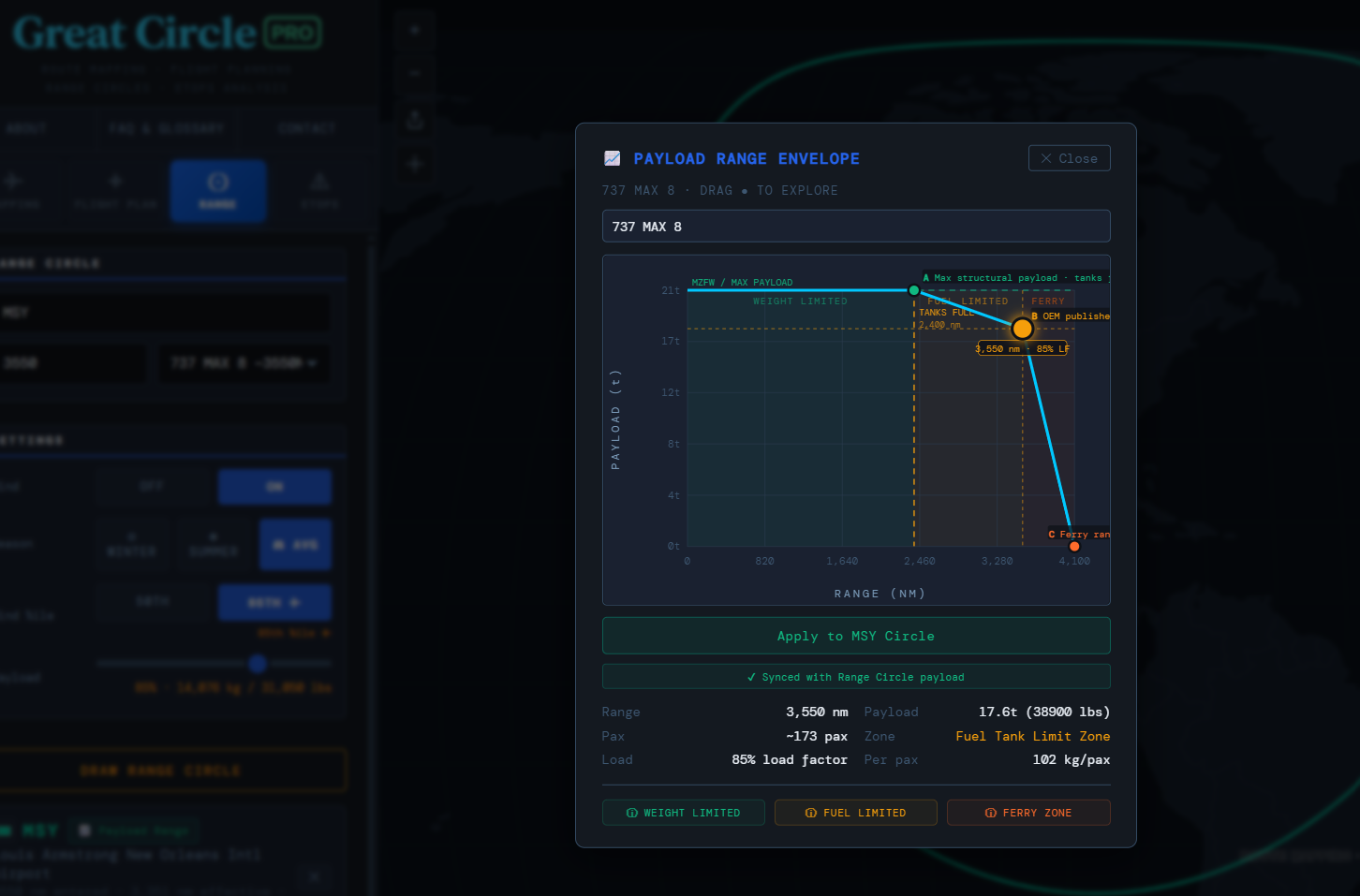
Payload-range charts define the performance envelope of an aircraft: the trade-off between how much revenue payload can be carried and how far it can be flown. Great Circle Pro's Payload-Range tab renders this chart interactively in the browser, letting planners and analysts plot the performance boundary of any aircraft type and overlay specific route distances against it.
The chart renders the three-segment payload-range curve that characterizes jet transport aircraft: the maximum structural payload segment where range is fuel-limited, the intermediate segment where payload trades for additional range, and the maximum fuel range segment where both payload and reserves sit at minimum. Each point on the curve reveals a dimension of operational flexibility, from belly freight capacity and full-load feasibility on long sectors to the outer limit of economic range extension.
Plot multiple aircraft types simultaneously to compare capabilities side by side and drop route distances directly onto the chart to see whether a mission falls in the unrestricted payload zone or into the trade-off region. Route strategists find this particularly useful when evaluating thin long-haul markets, assessing whether a longer-range variant is warranted, or quickly confirming whether a routing is physically feasible before deeper performance analysis.
- Three-segment curve with correct structural and fuel-limited breakpoints
- Multi-aircraft overlay for side-by-side type comparison
- Route distance plotted directly on the chart
- No software installation - runs entirely in the browser
Build a P-R chart →
Chain Routing
Multi-Leg Route Chain Builder
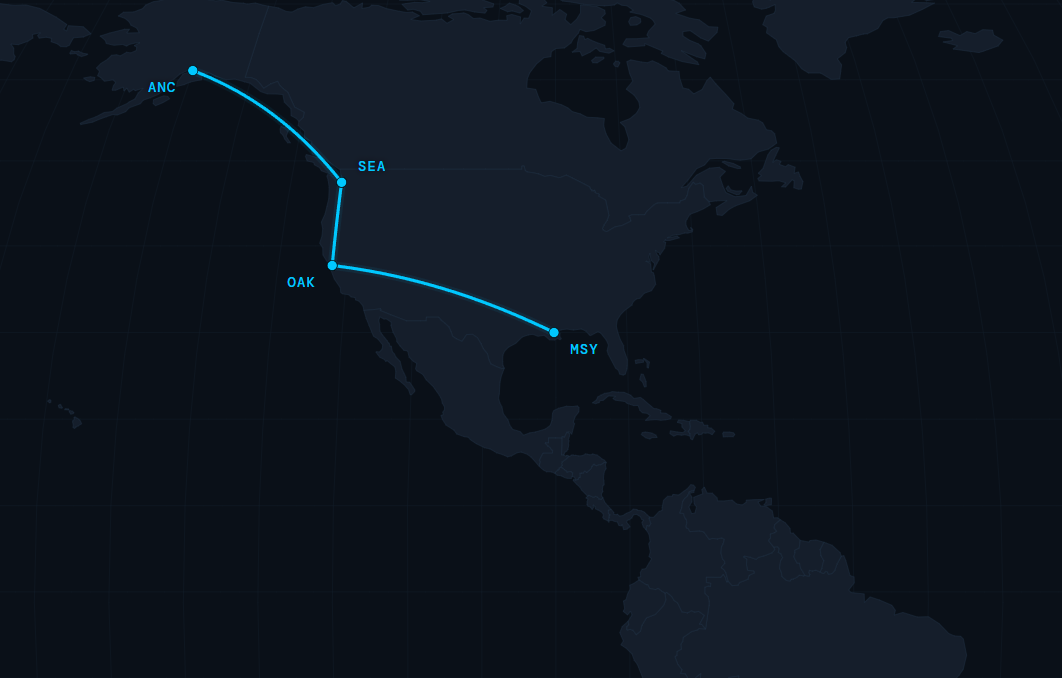
Real-world operations are rarely point-to-point. Aircraft rotate through multi-sector sequences, and understanding the cumulative time and distance of a full rotation is essential for scheduling, crew planning, and operational feasibility analysis. Great Circle Pro's Chain Routing tab lets you build multi-leg sequences that carry departure and arrival times forward through every successive sector, with a configurable ground buffer between each leg.
Add as many legs as your itinerary requires. Each leg inherits its departure time from the prior leg's arrival plus the buffer you set. Wind-adjusted flight times propagate correctly through the full chain, so the UTC time shown at each waypoint reflects realistic block times rather than still-air estimates. The result is a complete itinerary with departure and arrival UTC at every stop.
Chain routing is especially useful for ferry flights, proving runs, and technical positioning sequences where multiple stops connect a final delivery. It works equally well for modeling code-share itineraries, evaluating a rotation against crew duty period limits, or presenting a multi-stop charter journey to clients who want to see the whole trip at once. Every leg renders as an individual arc on the main map, keeping the visual and the numbers in sync throughout the build.
- Unlimited legs with automatic UTC time propagation across the full chain
- Configurable ground buffer between each sector
- Wind-corrected block times carried through every leg
- All legs rendered simultaneously as arcs on the live map
Build a chain route →
Azimuthal Map
Azimuthal Equidistant Projection Map
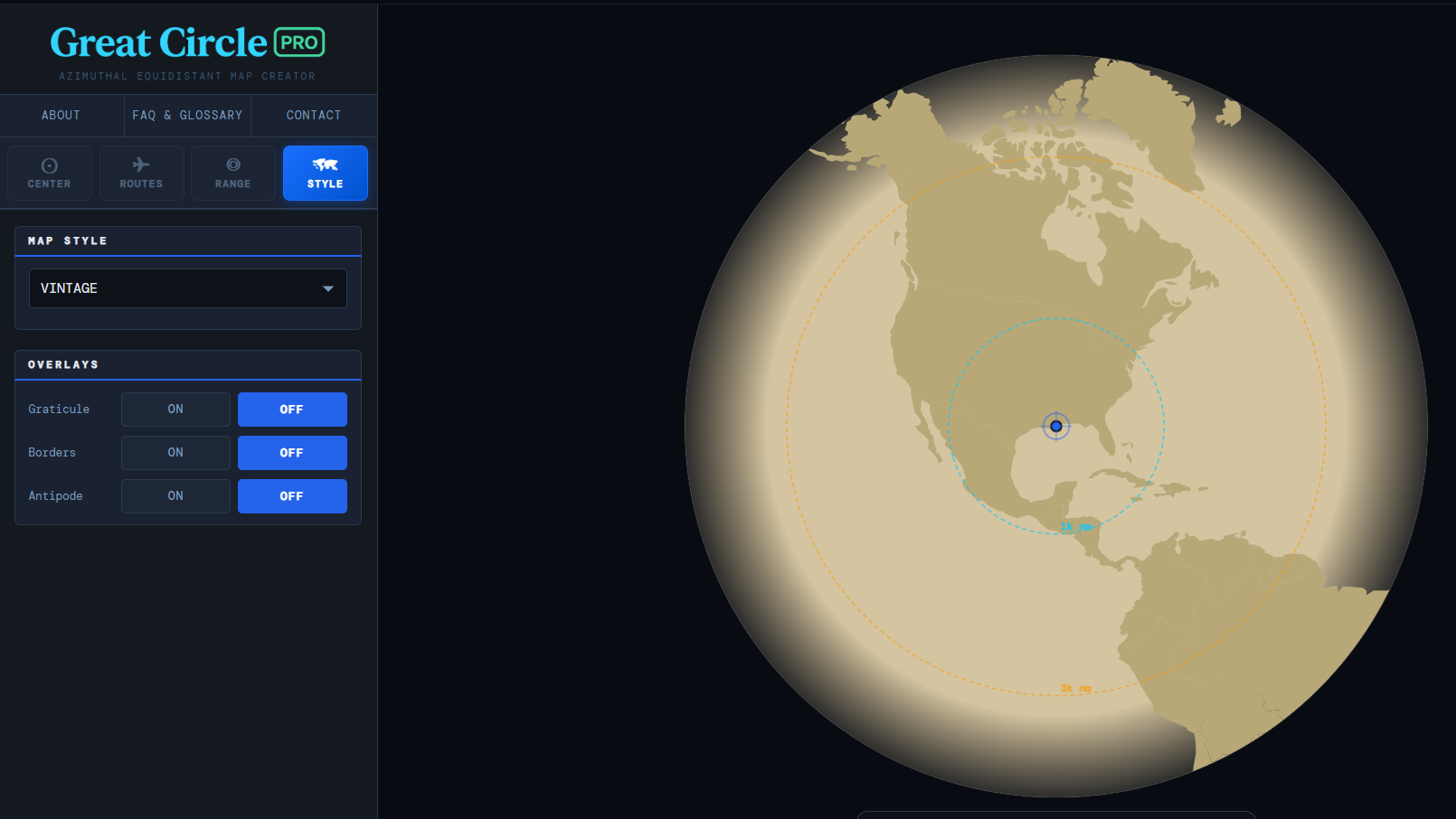
The azimuthal equidistant projection is the cartographic tool of choice for understanding the world from a single focal point. Every location appears at its correct great circle distance and true bearing from the center, a property no other common map projection offers. Great Circle Pro's Azimuthal tab renders this projection dynamically, recentered on any airport in the database, giving you an undistorted picture of global reach from that location.
Place any airport at the center and the world reorganizes around it. Cities that appear distant on a Mercator map may be surprisingly close when great circle distance is shown accurately. The classic example is polar routing between Tokyo and New York, far closer on a great circle path than any flat equatorial map suggests. The same dynamic applies across dozens of city pairs now served over Arctic and sub-Arctic corridors. The azimuthal map makes these geographic relationships immediately legible without any mental correction for projection distortion.
Aviation educators use azimuthal maps to teach great circle concepts to students whose intuition was shaped by Mercator world maps. Network planners use them to communicate route strategy to non-technical stakeholders in a format that needs no explanation. Pilots use them to internalize bearing and distance relationships from their home base. It is one of the most distinctive tools in the platform and one of the most effective for building real geographic intuition about the shape of the world's airways.
- True azimuthal equidistant projection centered on any airport
- Correct great circle distances and bearings from the center point
- Visual complement to the primary great circle route map
- Ideal for polar routing, network strategy, and aviation education
View the azimuthal map →
Aircraft Database
Commercial Aircraft Performance Reference
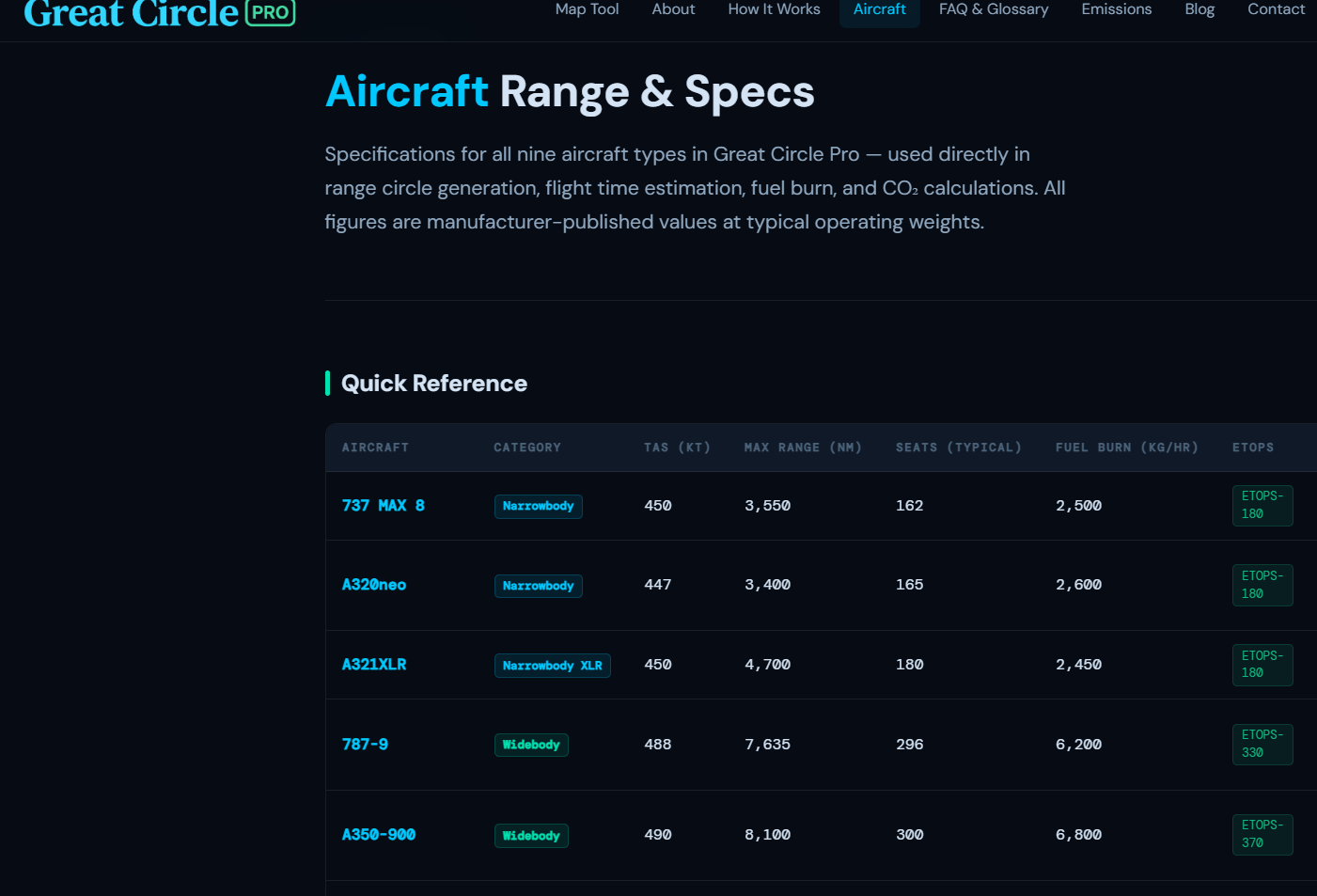
Great Circle Pro includes a searchable aircraft performance database covering the airliners, regional jets, turboprops, and general aviation types most commonly used in route planning analysis. Each aircraft entry includes published range figures, typical cruise speed, fuel burn estimates, payload capacity, and links to manufacturer performance documentation where available.
The database covers the full spectrum of current commercial types: narrowbody workhorses like the Boeing 737 MAX family and Airbus A320neo series, long-haul widebodies including the 787 Dreamliner, A350, and A330neo, ultra-long-range types capable of 19-hour nonstop operations, and regional aircraft from turboprops to 100-seat jets. Each entry is integrated directly with the Flight Planning and Range Circle tools so selecting an aircraft type in the database instantly populates the correct performance figures across every calculation on the map.
The aircraft page also includes payload-range envelope data for each type, letting you visualize the performance trade-off curve before opening the full interactive P-R chart. Fuel burn figures are presented in both kilograms and pounds per hour at typical cruise conditions, alongside CO2 emission factors for environmental impact assessment. Whether you are evaluating which aircraft fits a thin long-haul market, studying the difference between 737 MAX variants, or comparing narrowbody options for a new route, the aircraft database gives you the performance grounding to start that analysis with confidence.
- Full commercial fleet from narrowbodies to ultra-long-range widebodies
- Integrated with Flight Planning and Range Circle tools
- Payload-range envelope data and fuel burn figures per type
- CO2 emission factors for each aircraft category
Browse the aircraft database →
Live Turbulence
Real-Time Turbulence Map
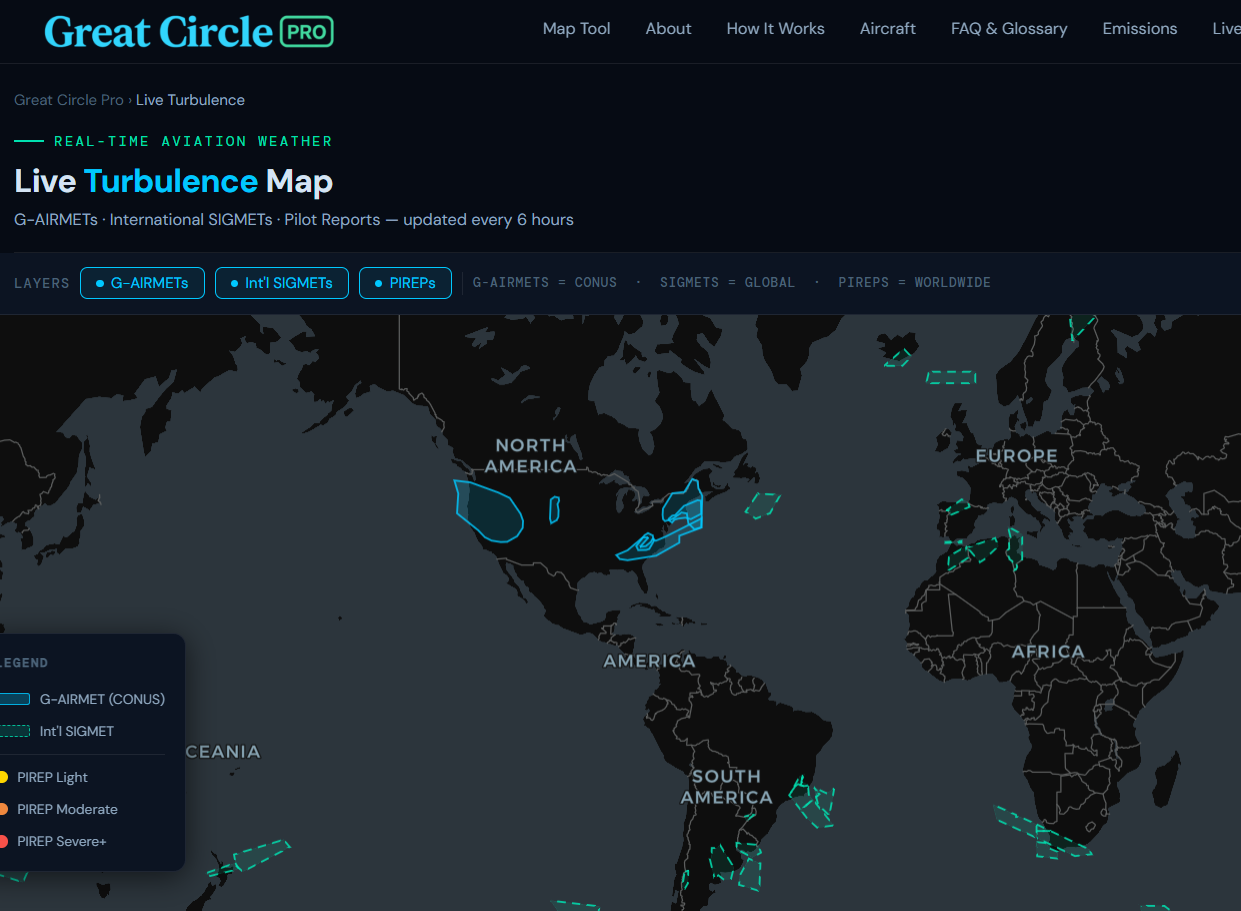
Great Circle Pro's Live Turbulence Map overlays current and forecast turbulence data across the global route network, sourced from real-time SIGMET reports, pilot reports (PIREPs), and numerical weather prediction output. The map updates continuously so the turbulence picture you see reflects conditions at altitude right now, not a static snapshot from hours earlier.
The tool is particularly useful for understanding why certain route corridors see significant deviations from the filed flight plan, where jet stream turbulence is creating passenger comfort and fuel burn impacts on transatlantic and transpacific routes, and which altitude bands are currently smooth versus rough across any region. Turbulence data is displayed as color-coded intensity overlays ranging from light to extreme, with SIGMET boundaries drawn directly on the map.
For pilots, dispatchers, and aviation weather enthusiasts, the Live Turbulence Map provides a quick, visual synthesis of the current upper-air weather picture without requiring access to specialized meteorological software. Overlay it mentally against the great circle routes you have plotted in the main tool to understand how today's weather is shaping actual routing and block time on any corridor. It is the same kind of big-picture situational awareness that experienced dispatchers develop over years, now accessible in a browser tab alongside the rest of the Great Circle Pro planning tools.
- Real-time SIGMET and PIREP turbulence data
- Color-coded intensity from light to extreme
- Global coverage across all major flight corridors
- Continuously updated, not a static forecast snapshot
Open the turbulence map →

Blog
Aviation Route Planning Guides and Analysis
The Great Circle Pro blog covers the methodology, math, and real-world application behind every tool on the platform. Articles range from introductory explainers on why great circle routes look curved on flat maps to deep dives into ETOPS regulatory history, polar routing economics, and the aerodynamics that determine payload-range trade-offs on long-haul widebodies.
Recent posts have examined how airlines choose between 85th percentile and 95th percentile wind assumptions for ETOPS planning, why the Boeing 787 and Airbus A350 opened previously uneconomical city pairs, and how range circle analysis can reveal which airports are genuinely competitive as connecting hubs versus which ones only appear that way due to Mercator projection distortion. Each post is written for readers who already understand the basics of commercial aviation and want to go deeper.
The blog also tracks new features as they are added to Great Circle Pro, with worked examples showing exactly how to use new capabilities in real planning scenarios. If you have used the tool to analyze a specific route or identify an interesting great circle anomaly, the blog is the best place to find the context that makes those observations meaningful. Posts are published regularly as new analytical techniques and route planning methodologies are added to the platform.
- In-depth methodology articles on great circle routing and wind modeling
- ETOPS regulatory analysis and polar routing economics
- Worked examples using real routes and real aircraft performance data
- Feature announcements with step-by-step usage guides
Read the blog →