How Great Circle Pro Works
The methodology, data sources, and thinking behind every feature, from great circle geometry to wind-adjusted range envelopes, seasonal wind models, and ETOPS diversion analysis. Everything a curious pilot, analyst, or avgeek might want to know without us handing over the keys to the cockpit.
Great Circle Routing
All routes are computed using the Haversine formula, which gives you the shortest path between two points on a sphere. We use an Earth radius of 3,440.065 nautical miles, and initial bearing is derived from the forward azimuth between origin and destination coordinates. If you remember your trig, you already know why this works. If you don't, just trust that the math has been flying airplanes for a very long time.
Routes render via D3.js geo path interpolation, which correctly handles the curvature of each active map projection. A great circle that arcs over Greenland on a Mercator view appears as a straight line on the Orthographic globe, exactly as it should. Rhumb line distance uses the Mercator-based loxodrome formula, and the difference between great circle and rhumb line distance is shown on every route card as a planning reference. On short hops the difference is negligible. On long-haul transoceanic routes it can add up to a surprisingly expensive detour.
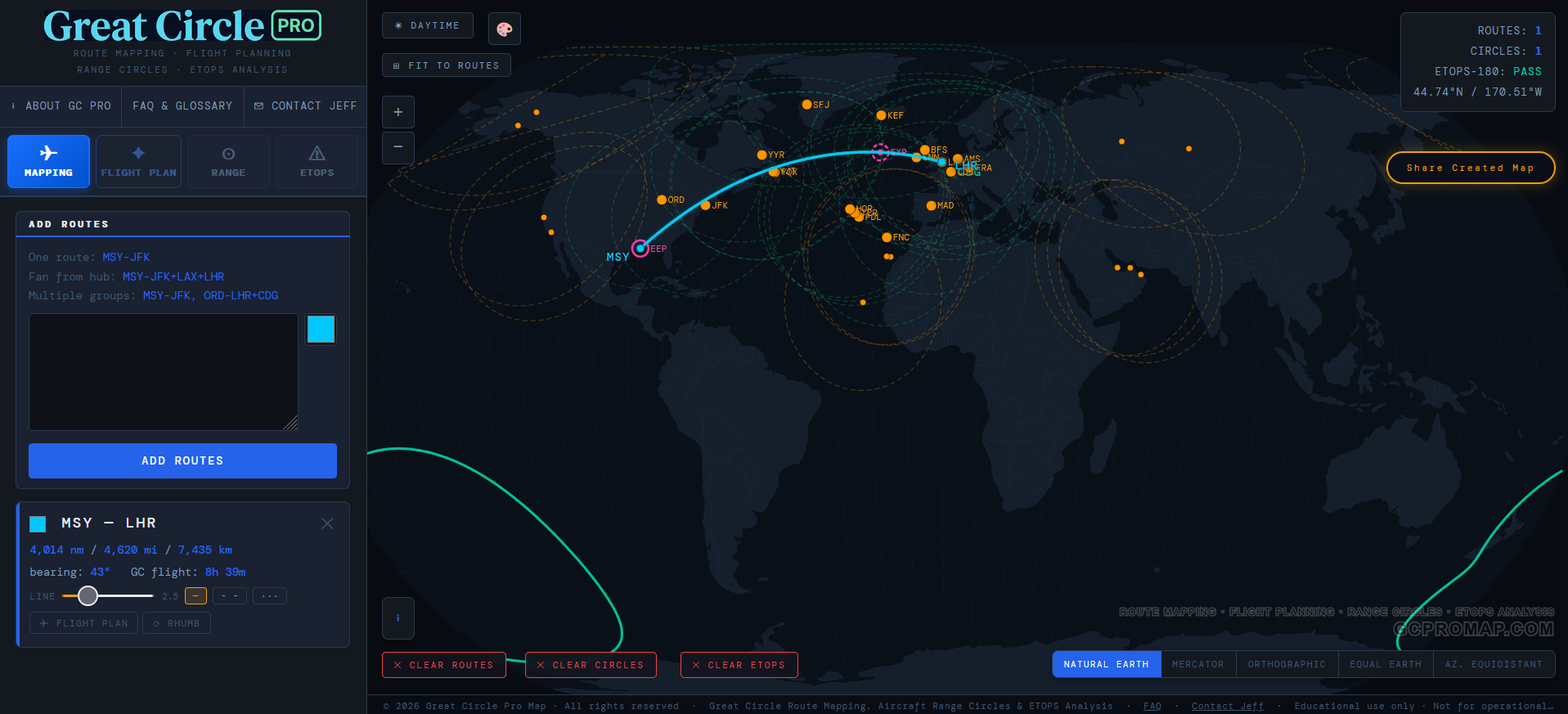
Wind-Adjusted Range Circles
A range circle is the set of all points an aircraft can just barely reach from a given airport. Without wind it's a perfect geodesic ring. With wind, it becomes something more interesting: an asymmetric envelope whose shape is driven by the jet stream, the trades, and every wind regime in between.
Great Circle Pro computes range circles in 3D on the unit sphere, then projects them to screen coordinates. The general approach: we sample a large number of compass bearings at fine angular resolution around the origin airport. For each bearing, we look up the wind at the relevant latitude from our atmospheric model, project that wind onto the heading to get a signed tailwind or headwind component, then adjust the radius. Tailwind stretches the circle outward. Headwind compresses it inward. The result is a smooth, closed contour that faithfully reflects the atmosphere's effect on range in every direction.
We apply a smoothing pass to remove any point-to-point noise (the real atmosphere is continuous, so the circle should be too) and clamp the adjustment within physically reasonable bounds so that even a roaring jet stream day can't produce a degenerate shape. The circle might get stretched into a dramatic egg, but it always stays well-behaved.
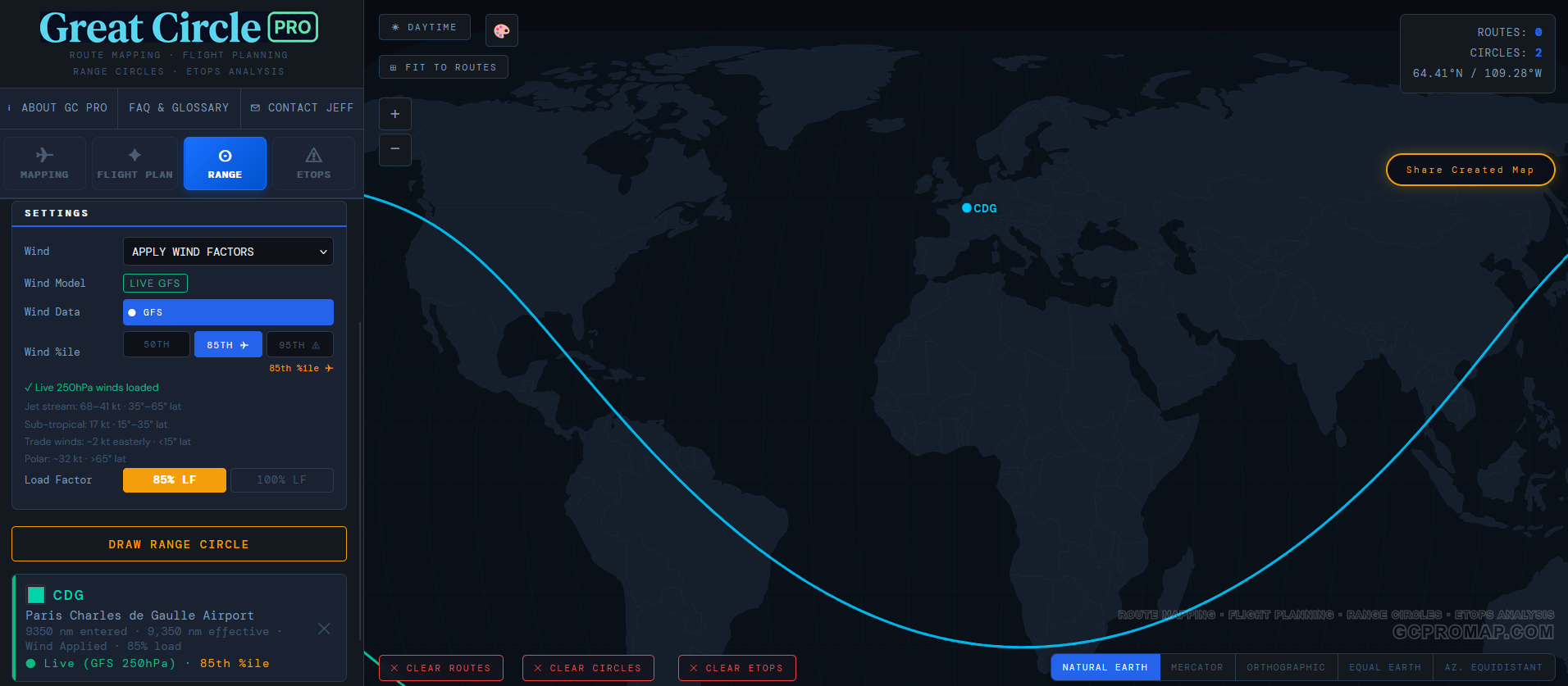
The result is an asymmetric envelope: the lobe pointing downwind stretches outward while the upwind face compresses inward. On a typical North Atlantic departure, the difference between the eastern and western reach of the ring can easily exceed several hundred nautical miles. That is a lot of cities that suddenly fall on one side or the other of "can we get there non-stop."
Why 250 hPa? The 250 hPa pressure level sits at approximately 34,000 ft, which covers the standard cruise altitude band for everything from a narrowbody A320neo to a widebody 777-9. It is where the jet stream lives, and it is the pressure level that matters most for en-route wind planning.
Wind Data and Seasonal Models
Great Circle Pro's wind model draws from global atmospheric data covering the full latitude range from the equator to the poles. We resolve the major features of the global wind circulation: the mid-latitude jet stream (the big one that bends your range circle into an egg), the subtropical jet, the equatorial trade winds that blow the opposite direction, and the polar vortex winds at high latitudes.
Each of these wind regimes has its own personality. The mid-latitude jet stream core can top 130 knots in a strong Northern Hemisphere winter. The trade winds are steadier but more modest, blowing easterly at roughly 15 to 20 knots. The polar winds sit somewhere in between. The model captures all of these and interpolates smoothly between latitude bands, so a range circle from Singapore (trade wind territory) looks very different from one drawn out of Anchorage (full-force North Pacific jet).
The season selector: Winter, Summer, and Average
Anyone who has flown westbound across the Atlantic in January already understands seasonal wind variation on a personal level. The jet stream is not a fixed feature. It migrates with the seasons, strengthening in winter when the temperature gradient between the tropics and the poles is steepest, and weakening in summer when that gradient relaxes.
Great Circle Pro gives you three seasonal wind modes:
| Mode | Source Period | What You're Seeing |
|---|---|---|
| ❄ Winter | December, January, February (DJF) | Peak jet stream strength. The jet core shifts equatorward and intensifies. Peak zonal winds in the 45 to 55 degree band can exceed 115 knots. This is your worst-case westbound headwind season. |
| ☀ Summer | June, July, August (JJA) | The jet weakens and shifts poleward. Peak winds drop to roughly 75 to 80 knots. Range circles become noticeably more symmetric, and westbound flights get a bit more breathing room. |
| ⚖ Avg | Blended Winter + Summer | A true point-by-point average of the winter and summer wind profiles at every latitude. Useful for year-round planning when you need a single representative envelope rather than a seasonal extreme. |
Why does this matter? Because an airline evaluating a year-round route needs to know whether the airplane can make it in January, not just in July. Drawing the winter and summer circles side by side from the same airport immediately reveals the seasonal swing. If the destination falls inside the summer circle but outside the winter one, you have a seasonal route on your hands, or you need a bigger airplane.
When you first toggle Wind to "On" in the Range tab, the tool defaults to Avg mode. That is the safest starting point for general planning. Switch to Winter when you need to stress-test a route against the toughest season.
The wind data is global. Both hemispheres are covered. A range circle from Johannesburg or Sydney uses the same atmospheric model as one from London or Chicago, with Southern Hemisphere wind patterns resolved independently. The jet stream down south behaves differently (it tends to be more zonally uniform and less wavy), and the model reflects that.
Percentile Models
Seasonal averages tell you what a typical winter or summer day looks like. But within any given season, wind speeds bounce around from day to day. Some January days the jet stream is screaming at 140 knots; other January days it is taking a nap at 60. A range circle needs to account for this variability, and that is where the percentile model comes in.
Great Circle Pro offers two percentile settings that scale the wind profile to represent different levels of atmospheric intensity:
| Model | What It Represents | Primary Use |
|---|---|---|
| 50th %ile | Median wind speed. Conditions you would expect on a typical day. | Day-to-day planning, block time estimates, general network analysis |
| 85th %ile | Wind speed exceeded only 15% of the time. A strong but realistic jet stream day. | Conservative range analysis, ETOPS diversion planning, airline dispatch |
The percentile scaling is not a flat multiplier applied uniformly everywhere. It varies by latitude, because wind variability itself varies by latitude. The trade winds near the equator are remarkably consistent day to day, so the gap between the 50th and 85th percentile there is relatively small. The mid-latitude jet stream, on the other hand, is a far more volatile creature, so the percentile spread is wider where it matters most. The model accounts for this with latitude-dependent scaling factors derived from long-term atmospheric reanalysis data.
Why the 85th percentile?
The 85th percentile is not arbitrary. It is the specific wind planning standard referenced in FAA Advisory Circular AC 120-42B and adopted by Boeing as the baseline for ETOPS route certification. The logic: if you size a diversion radius to median winds, that radius will be too small on roughly half of all actual flights. That is an uncomfortable failure rate when you are talking about an airplane that just lost an engine over the middle of the Pacific.
At the 85th percentile, the diversion radius holds on at least 85 out of 100 real-world flights. For general route analysis, the 85th percentile is also the most useful default because it shows what an aircraft can reliably achieve, not just what it can pull off on a calm Tuesday.
Why 85th percentile matters for ETOPS: When an engine fails over the ocean, the aircraft must divert to an alternate airport at reduced One Engine Inoperative (OEI) speed, potentially into strong headwinds. The 85th percentile model ensures the diversion radius shown on screen is valid on 85 out of 100 actual flights, which is the standard Boeing and ICAO use to certify a route as ETOPS-compliant.
ETOPS / EDTO Diversion Analysis
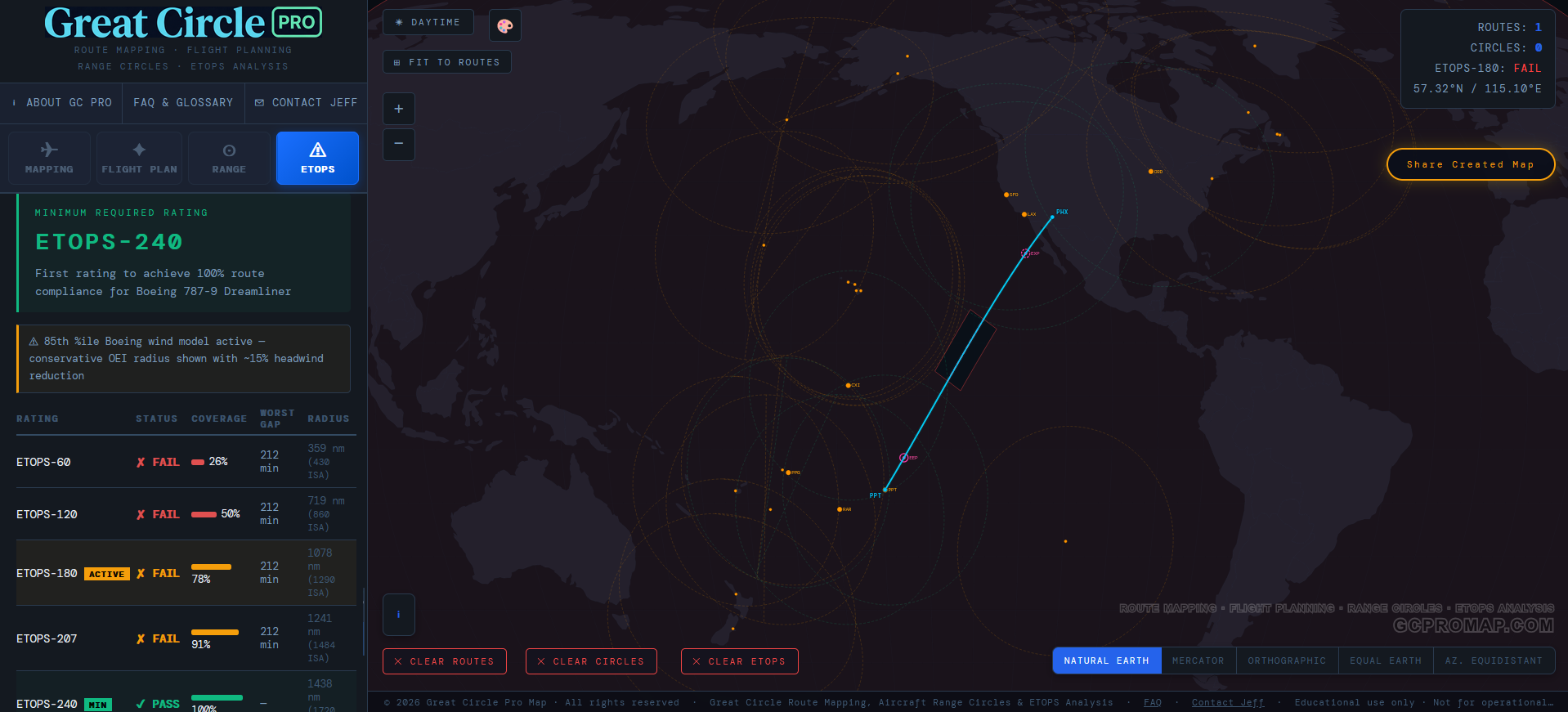
ETOPS (Extended-range Twin-engine Operational Performance Standards) defines how far a twin-engine aircraft may operate from a suitable diversion airport. The analysis works like this:
- Sample the route at regular intervals along the great circle path between origin and destination.
- Find the nearest adequate alternate from 90+ ICAO-recognised diversion airports at each sample point.
- Calculate OEI diversion time using the aircraft's published one-engine-inoperative cruise speed (typically 330 to 390 knots depending on type) and the distance to each alternate.
- Draw OEI radius bubbles centred on each diversion airport at the selected ETOPS rating (60, 90, 120, 138, 180, 207, 240, 330, or 370 minutes).
- Classify each route segment as covered (within at least one alternate's OEI bubble) or exposed (beyond all bubbles).
- Mark EEP and EXP, the ETOPS Entry Point (first point beyond standard coverage) and ETOPS Exit Point (where coverage resumes).
The ETOPS sensitivity panel lets you sweep through all standard ratings simultaneously, showing how the covered/exposed picture changes as the rating increases. That is useful for understanding what certification level a given route actually requires, which saves a lot of back-and-forth with the reg books.

Flight Time and Fuel Estimation
Flight time is calculated from great circle distance, the aircraft's true airspeed (TAS), and the average zonal wind component projected onto the route bearing. The wind contribution is computed at the route's midpoint latitude using the active season and percentile model, then applied as a groundspeed adjustment. Block time adds a configurable buffer (default 45 min) for taxi, climb, and descent, because nobody has ever pushed back from the gate and been immediately at cruise altitude no matter what the sim says.
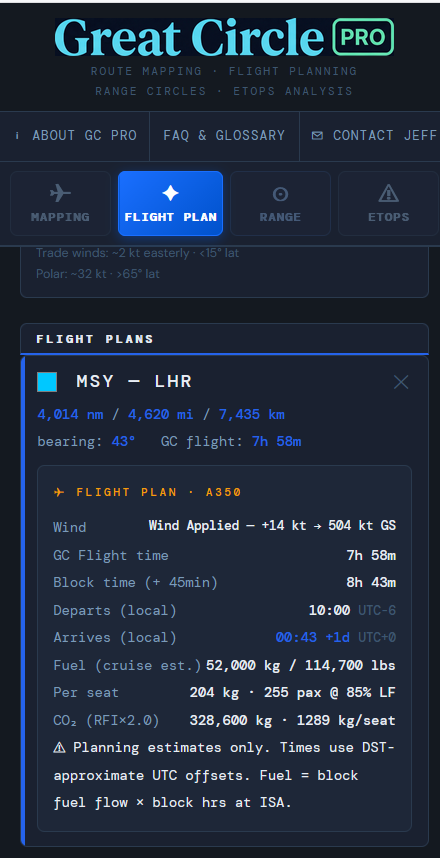
Fuel burn uses published cruise fuel flow for each aircraft type, scaled by load factor. CO2 is calculated at 3.16 kg per kg of Jet-A burned, which is the standard stoichiometric ratio. CO2e applies RFI 2.0 (Lee et al., 2021), which accounts for the additional warming from non-CO2 effects of aviation at cruise altitude (contrails, NOx, and water vapour), approximately doubling the direct CO2 figure. It is a sobering number, but it is the honest one.
Payload-Range Tradeoff
Every aircraft operates under two hard limits that together define its payload-range envelope: structural weight and fuel tank capacity. The Payload-Range diagram makes this tradeoff interactive and transparent, which is considerably more fun than reading a table in an Airport Planning Document.
What is payload?
Payload is passengers, bags, and cargo. Everything that generates revenue. Fuel is not payload; it is loaded separately and accounted for independently. This is the same convention Boeing and Airbus use in their Airport Planning documents. Great Circle Pro uses 102 kg (225 lbs) per person including bags, which is the Boeing standard passenger weight assumption.
The three zones
The classic payload-range curve has three distinct segments, each controlled by a different physical constraint:
- Weight Limited: The aircraft is at its Maximum Zero Fuel Weight (MZFW). The tanks are not yet full. At short ranges the airline can carry maximum structural payload. Adding more range means adding fuel, and something has to come off to stay under MTOW.
- Fuel Limited: The tanks are completely full (the Fuel Tank Limit line). Any extra range now requires reducing payload to keep total weight under Maximum Takeoff Weight. Every additional nautical mile costs kilograms of payload.
- Ferry Range: Payload is zero, maximum fuel loaded. This is the aircraft's theoretical maximum range with no commercial load. The OEM's published range (Point B on the diagram) is typically quoted at around 85% load factor.
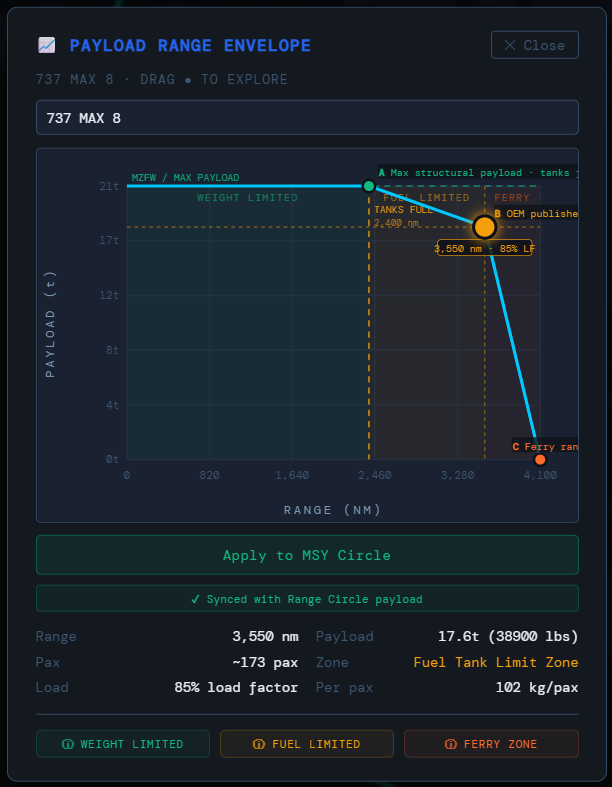
In Great Circle Pro, dragging the dot on the Payload-Range chart automatically updates the range circle on the map to reflect the selected operating point. Each drawn circle on the map stores its own independent payload-range setting, so you can compare how far a 777-9 flies at 95% load factor versus 75% by drawing both circles from the same airport and seeing them side by side.
Map Projections
Five projections are available, each with its own strengths:
- Natural Earth: A balanced pseudocylindrical projection and the best general-purpose view for global route planning. It is the default for a reason.
- Mercator: Conformal cylindrical. Great circles appear as curves; rhumb lines appear straight. Area is heavily distorted at high latitudes, which makes Greenland look like it could swallow Africa. It cannot.
- Orthographic (Globe): True perspective view from space. Great circles appear as straight lines across the face of the globe. Drag to spin, scroll to zoom. Feels like looking out the window of the ISS if the ISS had better labeling.
- Azimuthal Equidistant: All distances from the projection centre are true scale. Range circles appear as perfect circles. Auto-centres on your selected airport. This is the projection to use for hub network planning.
- Equal Earth: Equal-area pseudocylindrical. Landmass sizes are proportionally accurate, which is useful for comparing oceanic coverage regions where you need honest area comparisons.
Related Pages
Explore the complete feature list, browse the aircraft range & specs database, or read our in-depth guide to aircraft range circles. For definitions of aviation terms used here, see the FAQ & glossary.